

In order to start streaming live on your radio station, you’ll need to use a live broadcasting software. Nowadays, there is a multitude of different radio software to choose from which can be slightly overwhelming if you’re just getting started.Whether you’re on Windows or Mac OS, we’re here to help you find which broadcasting software suits your needs!
Whether you’re launching a brand-new online radio station or upgrading your current setup, choosing the right radio software is an important first step. The best solution depends on your broadcasting style, whether you’re hosting live talk shows, DJ sets, music programming or a mix of everything.
In this guide, we’ve rounded up some of the best radio broadcast software available for Windows and Mac to help you compare their features and find the perfect fit.
1/ Mixxx (Windows & Mac)
2/ Virtual DJ (Windows & Mac)
3/ BUTT (Windows & Mac)
4/ RadioBoss (Windows)
5/ Sam Broadcaster Pro (Windows)
6/ Jazler Spycorder (Windows)
7/ Winamp (Windows)
8/ LadioCast (Mac)
9/ Audio Hijack (Mac)
Why do I need radio software?
Hosting providers such as RadioKing provide you with an online stream that you can manager via an online interface. Your stream will broadcast automatically 24/7 according to the content that you schedule. This means that, once you have prepared your audio content, we take care of streaming it to the Internet so that your audience can tune in via their preferred device.
Radio software is used to go live on your radio station! It allows you to speak directly to your audience in real time, and even play music. Features will vary from one solution to another, so depending on what you’re planning to do, you’ll need to choose the appropriate software. There are many options available for all operating systems, let’s take a look!
Radio Software for Windows & Mac OS
MIXXX

This extremely popular DJ mixing software allows you to stream live mixes on your Internet radio. It includes 4 decks for great overall visibility, and allows you to easily organise your music thanks to an integrated database library.
A number of fun features are included such as: beat looping, EQ & crossfader controls, pitch & key controls and much more. You can easily record your live broadcasts, moreover, this free open-source software is also available on Linux.
Virtual DJ 8

Another well known audio mixing software in the radio world is Virtual DJ. The software includes many features like advanced mixers, equalization, powerful track management with smart folders and more.
It’s fully operational even without DJ hardware connected, however if you’re looking for compatibility with a whole range of controllers and mixers you’ll need to purchase the full license. You can also record your live broadcasts, and the interface is known to be more intuitive and user–friendly than Mixxx.
BUTT

BUTT (which stands for broadcasting using this tool) is another popular choice when it comes to Internet radio broadcasting as it’s extremely simply to use! The software comes with its own encoder so you don’t have download extra plugins when configuring your stream.
If you just want to stream live talk shows using an external microphone or mixer, then this is the software for you! Recording your live broadcasts is easy-peasy. Plus, the software is completely free to download!
Radio Software For Windows only
RadioBoss

Radio Boss is a Windows-based radio automation software. It’s by far one of the simplest tools available to manage tracks, create & schedule playlists and easily go live on your online radio station.
Other features also include a cross fade editor, automatic volume levelling and time announcements in various languages. Recording your live shows is completely possible too! The free trial offers roughly 50 uses, but if you want to benefit from this simple yet effective software you may find it worthwhile to purchase the full license.
Sam Broadcaster Pro

You’ve probably heard of Sam Broadcaster Pro, another well-known advanced radio automation software.
The software includes advanced audio features like cross-fade detection, volume normalization as well as a 5-band compressor and limiter. You can easily organise your music library into categories, import information from tags and even look up track information automatically via Amazon.com.
A free 14-day trial is available, however if you wish to continue using the software you’ll need to purchase it for $299.
Jazler Spycorder

Jazler Spycorder is a live broadcasting software for Windows that allows you to easily speak live on your radio. Simply configure your radio stream and click on “Start”!
The software also includes a schedular and allows you to record your live stream. The free trial expires after 2 hours, so you’ll need to purchase the full version to benefit from an unlimited access.
Winamp

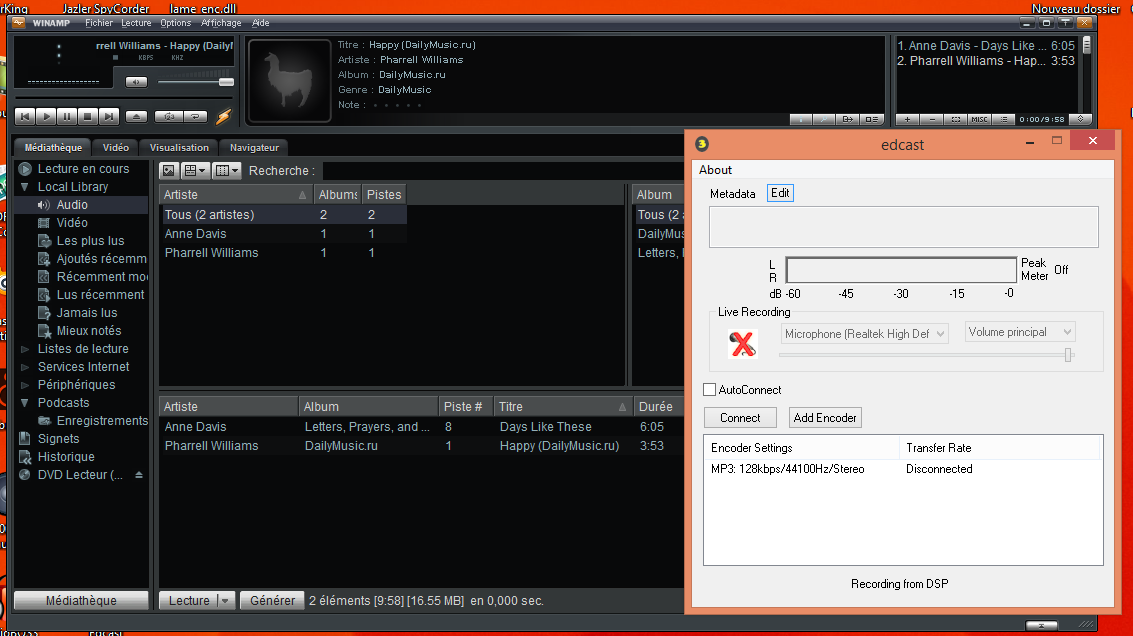
Winamp is a free media player that has been around since 1997!
If you’re looking for a software to speak live to the listeners of your radio station, then look no further! Bear in mind that you’ll need to download the Edcast DSP plugin in order to broadcast live on your radio station.
Once you have configured your radio, plug in your microphone and you’re good to go!
Tutorial: Discover our tutorial here.
For Mac only
LadioCast

LadioCast is a standalone encoder for those who want to broadcast via a microphone and mix in music. With 4 inputs and 4 outputs you can connect and manage multiple devices like microphones, mixers, CD players, and decks.
It’s incredibly easy to configure, and free to download!
Audio Hijack

Audio Hijack is a DAW (Digital Audio Workspace) designed for numerous purposes such as: the recording of podcasts, radio shows or even phone calls. The software is incredibly intuitive and customizable thanks to the various blocks that you can add and remove as you wish.
The software offers templates that you can use and edit, or you can create a completely new blank session from scratch. It’s even great for broadcasting your listeners live on air!
How to choose the best radio software
With so many options available, choosing the right radio software comes down to how you plan to broadcast. Here are a few questions to ask yourself before making your choice:
- Do you only need to broadcast live, or do you also need playlist automation?
- Will you be broadcasting music, talk shows, or both?
- Do you need support for external mixers or DJ controllers?
- Are you looking for a free solution or professional radio broadcast software with advanced features?
- Which operating system are you using: Windows or macOS?
If you’re just starting out, free software such as Mixxx or BUTT can be more than enough. As your station grows, you may decide to upgrade to more advanced radio broadcast software like RadioBoss or Sam Broadcaster Pro.
Frequently Asked Questions
Radio software allows broadcasters to stream live audio over the Internet. Depending on the software, it may also include automation features such as playlist scheduling, audio processing, music library management and recording.
What is the best free radio software?
If you’re looking for free radio software, Mixxx, BUTT and Winamp are all popular choices. The best option depends on whether you’re DJing, hosting talk shows or simply broadcasting a microphone feed.
What is radio broadcast software used for?
Radio broadcast software connects your computer to your streaming server so you can broadcast live to your listeners. Some applications also include professional tools like automation, scheduling, crossfading and audio enhancement.
What’s the difference between live and automatic broadcasting?
Live broadcasting allows you to speak to your listeners in real time, in order to do so you need to connect your radio stream to a live broadcasting software.
Automatic broadcasting allows you to schedule your content beforehand via an automation system (such as RadioKing’s Radio Manager). Your content will broadcast automatically as scheduled without you having to intervene.
Which radio broadcasting software can I use with RadioKing?
RadioKing is compatible with all the software solutions listed in this article, and more!
As you can see, there are many different available options when it comes to choosing the right live radio software! Whether you’re looking for simple radio software for live broadcasting or a complete radio broadcast software with automation features, there’s a solution for every type of online radio station. Most of the tools in this guide offer free versions or trial periods, making it easy to test them before committing.
Which software do you use for your live broadcasts? Let us know in the comments!