
If you run an internet radio station, you already know how important it is to reach your listeners wherever they are. But here’s the thing: more and more people are consuming audio content on their smartphones. So if your station doesn’t have a dedicated radio station mobile app, you could be missing out on a huge chunk of your potential audience. RadioKing makes it surprisingly simple to build, customize, and launch your own mobile app, even if you have zero coding experience. Let’s walk through everything you need to know.
1/ Why create a mobile app?
2/ Key features
3/ How to create a radio station mobile app?
4/ Enhance listener engagement
5/ Monetize your radio app
6/ Go further
1/ Why Your Radio Station Needs a Mobile App
Think about how your listeners spend their day. They commute, they work out, they cook dinner, and throughout all of it, their smartphone is right there with them. A dedicated radio station mobile app puts your station directly in their pocket, making it easier than ever to tune in without hunting for a website or browser-based player.
Increase Listener Engagement
A mobile app gives your audience a seamless, one-tap listening experience. No buffering issues from a web browser, no complicated navigation. Just your station, ready to play the moment they open the app. That kind of convenience translates directly into longer listening sessions and more loyal fans. When tuning in feels effortless, people do it more often.
Enhance Your Brand Presence
Having your own branded app on the App Store and Google Play is a serious credibility boost. It signals to listeners, sponsors, and potential partners that your station is professional and here to stay. Your logo, your colors, your identity, all presented in a sleek mobile experience that reinforces your brand every single time someone opens it.
Plus, with RadioKing’s Premium Offer, your app is available on Apple CarPlay, Apple Watch, Apple TV, Android TV and Android Auto.
Stay Competitive in the Digital Age
Audio streaming is one of the fastest-growing media formats in the world. Listeners today expect modern, accessible options for consuming content. By offering a dedicated mobile streaming app, you position your station alongside major broadcasters and platforms, showing your audience that you’re committed to giving them the best possible listening experience. Staying relevant means going where your listeners already are!
2/ Key Features of RadioKing’s Mobile App
RadioKing doesn’t just help you slap together a basic player. The platform gives you a genuinely feature-rich app that can compete with the big names in audio streaming. Here’s a closer look at what you get.
A Fully Customizable Radio Player
The core of any good radio station mobile app is the player. You can customize the colors, layout, and design to match your brand perfectly. Listeners get a clean, intuitive interface that makes controlling playback completely natural. The player also displays track information and cover art, which adds a polished, professional feel to every listening session.
You can also activate options such as:
- display contact buttons (call, SMS, email)
- auto-play
- share this track
- buy via Apple music (if you have an Apple affiliate ID)
- sleep timer
- track votes (allows you to see which tracks your listeners ‘like’ or ‘dislike’)
Extra Features That Keep Listeners Coming Back
Beyond the player itself, RadioKing packs in a range of features designed to enrich the listener experience. You can add and customize as many tabs as you want:
- RSS feeds: Share your latest blog posts, news, podcasts, or show updates directly within the app simply by adding an RSS feed.
- Website tab: Add the URL of your website or social media profiles to give you listeners easy access to additional content.
- Custom HTML tabs: Add personalized pages with any content you want, from event schedules to artist bios.
- Alarm clock: Let your listeners wake up to their favorite station every morning. It’s a simple feature that builds a powerful daily habit.
- Audio shout-outs: Receive audio messages from your listeners and broadcast them on your radio station. (Included in our Pro and Business Radio offers)
Multiple Streams Support
Running more than one show format or serving multiple audiences? RadioKing’s multiple streams support lets you include several audio streams within a single app. Your listeners can switch between a music channel, a talk radio format, or a special interest program without ever leaving the app. This kind of flexibility is a major asset for growing stations looking to diversify their programming.
3/ How to Create a Radio Station Mobile App with RadioKing
One of the biggest reasons broadcasters love RadioKing is just how approachable the whole process is. You don’t need a development team or a technical background. Here’s how it works.
Using the Online App Simulator
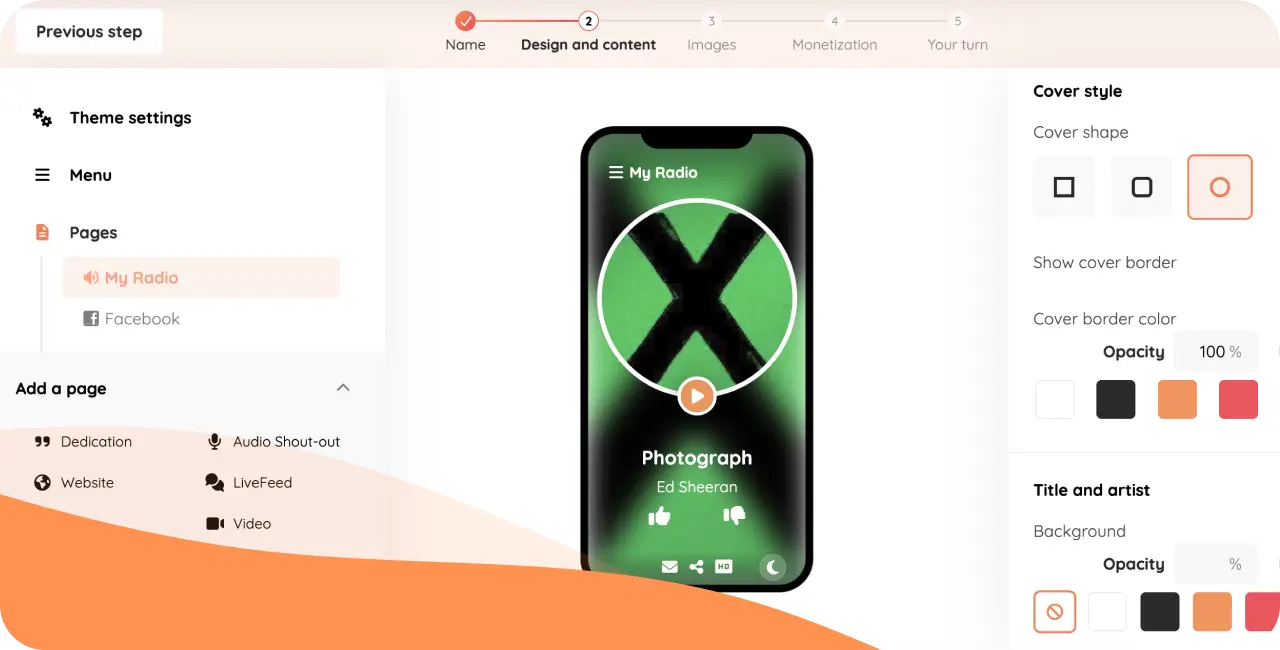
RadioKing provides an intuitive online app simulator, which you can test for free. The simulator lets you build and preview your app in real time, directly in your browser. The step-by-step process guides you through each element of your app:
- Create RadioKing account and create your demo app for free
- Give your app a name
- Configure your theme settings to reflect your brand identity (language, colors, styles…)
- Set up your app menu (tabs, names, icons)
- Configure your radio stream(s) and player
- Add as many tabs as you want and configure each one independently
Customizing Your App Design and Layout
The design phase is where your station’s personality really comes through. RadioKing gives you control over colors, fonts, icons, and the arrangement of your app’s different tabs. Want your player front and center with a news feed just below it? Done. Want to encourage listener participation through audio shout-outs or a custom form? That works too. The goal is to create an experience that feels uniquely yours, not a generic template that could belong to anyone.
Real-Time Updates and Testing
One of the most valuable aspects of the RadioKing simulator is that every change you make is reflected instantly. You can test how your app looks, adjust elements, and refine the experience without waiting for slow refresh cycles or technical deployments. Once you’re happy with the result, RadioKing can even handle the submission process to get your app published on both the Apple App Store and Google Play Store.
4/ Enhancing Listener Engagement Through Your Mobile App
Building the app is just the beginning. The real magic happens when you use it as an active tool to connect with your audience and keep them coming back for more.
Push Notifications
Push notifications are one of the most direct and effective ways to communicate with your listeners. With RadioKing, you can send instant alerts to let your audience know about a special guest, a live show, a contest, or breaking news from your station. You can also program your notifications in advance, and send them according to specific locations. Unlike social media posts that can easily get lost in a feed, push notifications appear directly on your listeners’ lock screens, making sure your message gets seen right away.
Interactive Content: Podcasts, News, and Videos
Modern listeners want more than just a music stream. They want content they can interact with and explore at their own pace. Integrate podcasts, news articles, and video content alongside your live stream and turn your app into a complete media hub rather than a simple player. This can dramatically increase the time listeners spend engaging with your station.
With the audio-shout out widget, your listeners can even leave you vocal messages that appear directly in your Radio Manager, ready for you to broadcast on air! You could also create your own custom interactive elements thanks to the blank HTML tab.
Audience Statistics
Understanding your listeners is key to growing your station. RadioKing provides statistics that give you insight into how people are using your app with the number of people subscribed to your notifications, number of notifications sent and much more. Armed with this plus the data from your Radio Manager, you can make smarter decisions about your programming, schedule your best content for maximum impact, and tailor your broadcasts to better match what your audience actually wants.
5/ Monetizing Your Radio Station Mobile App
Your radio station mobile app is not just a listener service tool, it can also be a real revenue opportunity. Here are some of the most effective ways to monetize your app and turn it into a meaningful income stream.
Advertising Opportunities
A mobile app gives you dedicated real estate for advertising. You can include banner ads, interstitials, or sponsored content within your app in a way that feels integrated rather than intrusive. Because your audience is already engaged and tuned in, advertisers get genuine value from the exposure, making your app an attractive proposition for local businesses and brands.
Partnerships and Sponsorships
Your app can serve as a powerful vehicle for partnerships and sponsorships. A local business could sponsor a specific tab in your app, a show within the app, or a series of push notifications. These kinds of arrangements can generate consistent revenue while also providing genuine value to your listeners by connecting them with relevant local services and offers.
6/ Go further with RadioKing Pro Solutions
Take your radio station mobile app to the next level with RadioKing Pro Solutions, to help amplify your brand with an app that feels 100% like you thanks to:
- Completely customized interface
- Optimized and modular content
- Custom features created exclusively for your radio
- Optimized for iOS, Android, CarPlay, Android Auto, iPad, Apple Watch, and Smart TV
- RadioKing handles Apple store & Google compliance, technical management, as well as the publication and updates of your app.
Ready to get start on your radio station’s mobile app?