


Anthropic released Claude Haiku 5.5 on October 7, 2026, and calls it its cheapest, fastest, and most capable small model. The API model ID is claude-haiku-5-5, and prompts up to 100,000 tokens cost \$0.10 per million input tokens and \$0.50 per million output tokens. This article covers what changed since Haiku 4.5, how to build fast, cheap AI workflows with it in Python (classification, extraction, and sub-agents), and when a bigger Claude model is still the better pick.
Haiku 5.5
Anthropic positions Haiku 5.5 for high-volume, cost-sensitive work such as summaries, compaction, database queries, and classification, and as a subagent alongside Opus 5.5 and Sonnet 5.5. It is available on the Claude Platform, Amazon Web Services, Google Cloud, and Microsoft Azure. Its safety evaluations are documented in the system card. Anthropic’s deprecation page lists the earliest retirement date as October 7, 2027.
What’s New Compared With Haiku 4.5?
| Feature | Haiku 4.5 | Haiku 5.5 |
|---|---|---|
| Context window | 200K tokens | 1M tokens |
| Max output | 64K tokens | 128K tokens |
| Thinking control | Manual thinking budget | Adaptive thinking with an effort setting, a first for a Haiku |
| Price per million tokens, prompts up to 100K (input / output) | \$1.00 / \$5.00 | \$0.10 / \$0.50 |
| Price over 100K | \$1.00 / \$5.00 | \$0.50 / \$2.50 |
| Smallest cacheable prompt | 4,096 tokens | 512 tokens |
| GDPval-AA (knowledge work) | 735 | 1620 |
| OSWorld 2.1, offline subset (computer use) | 15.7% | 72.4% |
| Humanity’s Last Exam, no tools | 10.2% | 45.9% |
| Terminal-Bench 4.0 (agentic coding) | 0.0% | 39.2% |
The benchmark rows are Anthropic’s own results, and the launch page shows Sonnet 5.5 ahead on all four (for example, 70.6% on Terminal-Bench 4.0). The price cut is also smaller in practice than the list prices suggest. Haiku 5.5 uses a newer tokenizer, so the same text counts as roughly 30% more tokens. Anthropic puts the average saving at around 75%, after accounting for the tokenizer and for the 10% of requests that run over 100K tokens.
Three changes can break existing Haiku 4.5 code. The what’s-new page lists them as breaking: sending temperature, top_p, or top_k returns an error, ending the messages with an assistant prefill returns an error, and manual thinking with budget_tokens returns an error. Two behavior changes matter as well. Adaptive thinking is on by default, so a response can start with a thinking block, and thinking tokens count toward max_tokens. Safety classifiers can also decline a request, so your code must handle stop_reason: "refusal". On safety, Anthropic says Haiku 5.5’s cybersecurity safeguards are stricter than Haiku 4.5’s and block penetration testing.
Using Haiku 5.5 for Fast, Cheap Workflows
You need Python 3.10 or newer, an API key from the Claude Console, and a recent Anthropic SDK, since the code below uses the newer output_config parameter.
pip install -U anthropic
export ANTHROPIC_API_KEY="your-key-here"
The first command installs or upgrades the official Python SDK. The second stores your key in the shell session, and the SDK reads ANTHROPIC_API_KEY automatically. On Windows PowerShell, use $env:ANTHROPIC_API_KEY="your-key-here".
Step 1: Classification and Extraction
These are the two jobs Haiku was built for: a short input and a short, structured answer, repeated thousands of times. The code uses JSON outputs, which constrain the reply to a schema you provide. It also holds the shared price table and a cost helper that the next two scripts reuse.
# haiku_tasks.py
"""Fast, cheap Claude Haiku 5.5 calls: classification and extraction with JSON outputs."""
import json

import anthropic

MODEL = "claude-haiku-5-5"
client = anthropic.Anthropic()    # reads ANTHROPIC_API_KEY from the environment

# USD per million tokens (input, output) for prompts up to 100K tokens.
PRICES = {
    "claude-haiku-5-5": (0.10, 0.50),
    "claude-sonnet-5-5": (2.00, 10.00),
    "claude-opus-5-5": (4.00, 20.00),
}

CATEGORY_SCHEMA = {
    "type": "object",
    "properties": {"category": {"type": "string", "enum": ["billing", "shipping", "technical", "other"]}},
    "required": ["category"],
    "additionalProperties": False,
}

INVOICE_SCHEMA = {
    "type": "object",
    "properties": {
        "vendor": {"type": "string"},
        "invoice_number": {"type": "string"},
        "total": {"type": "number"},
        "currency": {"type": "string"},
        "due_date": {"type": "string", "description": "ISO date, YYYY-MM-DD"},
    },
    "required": ["vendor", "invoice_number", "total", "currency", "due_date"],
    "additionalProperties": False,
}


def cost_usd(model, usage):
    price_in, price_out = PRICES[model]
    return (usage.input_tokens * price_in + usage.output_tokens * price_out) / 1_000_000


def ask_json(schema, instruction, text, model=MODEL, effort="low"):
    """One request whose reply must be JSON matching `schema`. Returns (data, usage)."""
    reply = client.messages.create(
        model=model,
        max_tokens=1000,    # thinking tokens count toward this limit, so leave headroom
        system=instruction,
        messages=[{"role": "user", "content": text}],
        output_config={"effort": effort, "format": {"type": "json_schema", "schema": schema}},
    )
    if reply.stop_reason in ("refusal", "max_tokens"):
        raise RuntimeError(f"No usable answer, stop reason: {reply.stop_reason}")
    # A reply can start with a thinking block, so pick the text block by type.
    answer = "".join(block.text for block in reply.content if block.type == "text")
    return json.loads(answer), reply.usage


def classify(text, model=MODEL):
    data, usage = ask_json(CATEGORY_SCHEMA, "Classify the customer message.", text, model)
    return data["category"], usage


def extract_invoice(text, model=MODEL):
    data, usage = ask_json(INVOICE_SCHEMA, "Extract the invoice fields from the text.", text, model)
    return data, usage


if __name__ == "__main__":
    for message in ["I was charged twice this month.", "My parcel never arrived.", "The app crashes on login."]:
        category, usage = classify(message)
        print(f"{category:<10} {usage.input_tokens} in / {usage.output_tokens} out  <- {message}")

    invoice = "Acme Cloud Ltd, invoice AC-2291. Total due: 1,240.50 USD by 15 November 2026."
    fields, usage = extract_invoice(invoice)
    print(fields, f"(${cost_usd(MODEL, usage):.6f})")
PRICES lists input and output prices per million tokens for the three models (from Anthropic’s launch page and pricing page), and cost_usd turns a response’s token counts into dollars. The two schemas describe the output you want: CATEGORY_SCHEMA limits category to four allowed values, and INVOICE_SCHEMA lists five fields.
ask_json is the core function. It sends one request with the schema inside output_config.format, and effort set to low, so the model spends little time thinking on an easy task. Anthropic’s JSON outputs guarantee valid JSON that matches the schema. Notice what is missing: there is no temperature, because Haiku 5.5 rejects it. max_tokens is 1000 even though answers are tiny, since thinking tokens count against it. Two checks follow. A stop reason of refusal or max_tokens raises an error instead of failing silently on a half-empty reply. Then the text is read by block type, because a reply may begin with a thinking block, and parsed as JSON.
I used JSON outputs instead of forcing a tool call on purpose. Haiku 5.5 accepts a forced tool call, but Opus 5.5 rejects one with a 400 error, so JSON outputs are the portable choice for the three-model comparison in Step 3. One caveat: JSON outputs are not available on Amazon Bedrock for Haiku 5.5, so on Bedrock you describe the format in the prompt and validate the result yourself. Run it:
python haiku_tasks.pyThe __main__ block classifies three messages and extracts fields from one invoice, printing the tokens used and the cost of the extraction. Expect one category per message and a dictionary with five fields.
Step 2: Sub-Agents
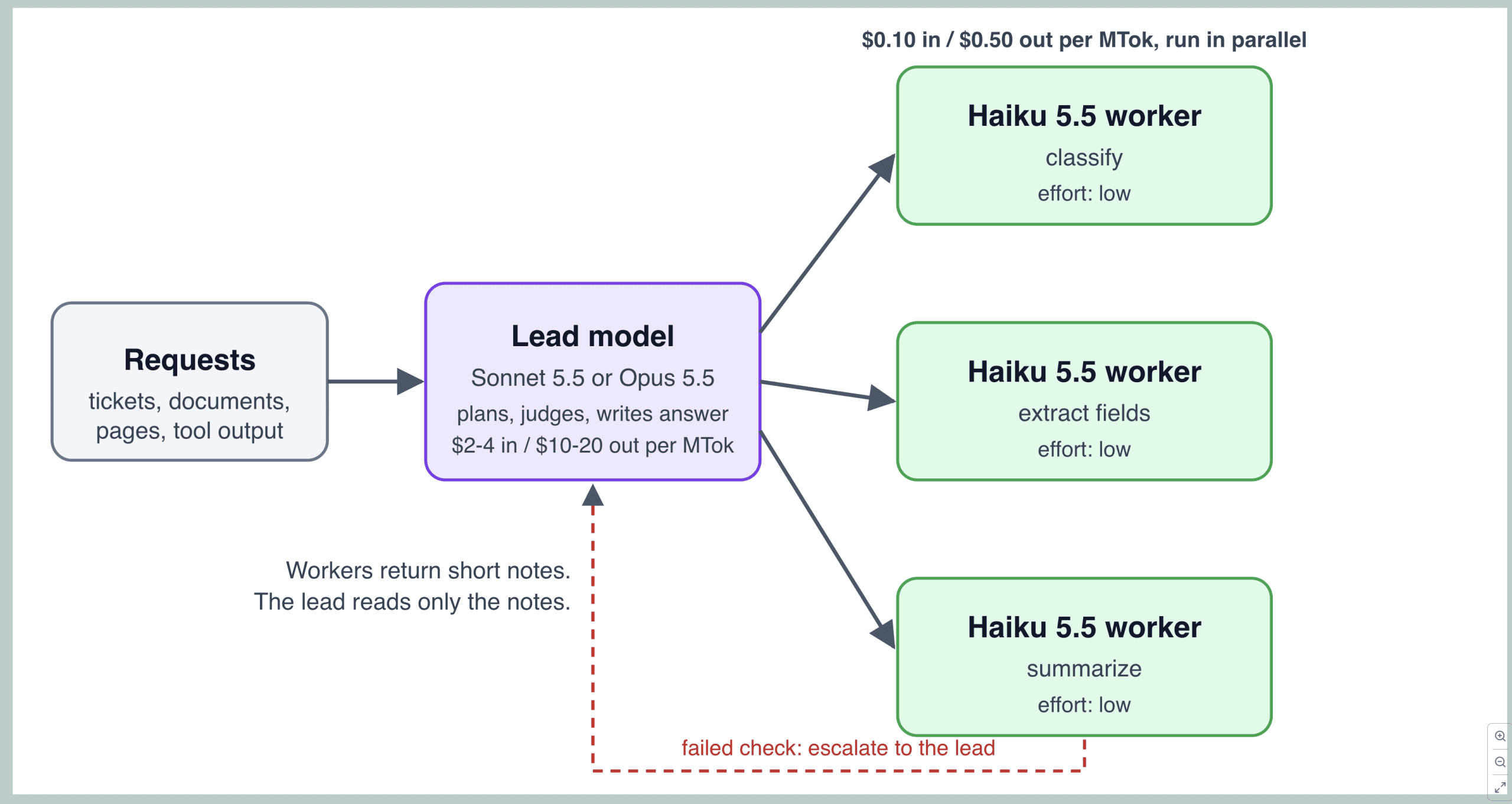
A sub-agent setup splits the work. A larger model decides what to do and writes the final answer, while many Haiku workers handle the narrow, repetitive jobs in parallel. This is the pattern Anthropic names for Haiku, and Cognition reports using Haiku 5.5 as the sidekick in Devin Fusion with Opus 5.5 as the lead.
# subagents.py
"""A lead model delegates narrow jobs to parallel Haiku 5.5 workers, then writes the answer."""
import asyncio

import anthropic

from haiku_tasks import MODEL as WORKER, cost_usd

LEAD = "claude-sonnet-5-5"
client = anthropic.AsyncAnthropic()


def text_of(reply):
    return "".join(block.text for block in reply.content if block.type == "text")


async def summarize(name, document, limit):
    async with limit:    # cap how many workers run at once
        reply = await client.messages.create(
            model=WORKER,
            max_tokens=1500,
            system="Summarize the document in two sentences. Keep names, dates and amounts exact.",
            messages=[{"role": "user", "content": document}],
            output_config={"effort": "low"},
        )
    return name, text_of(reply), cost_usd(WORKER, reply.usage)


async def answer(documents, question):
    limit = asyncio.Semaphore(8)
    notes = await asyncio.gather(*(summarize(n, d, limit) for n, d in documents.items()))
    worker_cost = sum(cost for _, _, cost in notes)

    brief = "\n".join(f"[{name}] {summary}" for name, summary, _ in notes)
    reply = await client.messages.create(
        model=LEAD,
        max_tokens=2000,
        system="You are the lead analyst. Answer using only the worker notes.",
        messages=[{"role": "user", "content": f"Question: {question}\n\nWorker notes:\n{brief}"}],
        output_config={"effort": "medium"},
    )
    return text_of(reply), worker_cost, cost_usd(LEAD, reply.usage)


if __name__ == "__main__":
    documents = {
        "contract-a": "Northwind renewed its support contract on 3 March 2026 for 48,000 USD per year.",
        "contract-b": "Contoso signed a 12-month license on 9 May 2026. The fee is 15,500 USD, billed quarterly.",
        "contract-c": "Fabrikam's agreement ends on 30 June 2026 and renews only if either party gives notice.",
    }
    text, worker_cost, lead_cost = asyncio.run(answer(documents, "Which agreements need action before July 2026?"))
    print(text)
    print(f"workers: ${worker_cost:.6f}  lead: ${lead_cost:.6f}")
summarize is one worker. It asks Haiku for a two-sentence summary at low effort and returns the document name, the summary, and the cost. The Semaphore caps how many workers run at the same time, which keeps you inside your rate limits. answer starts every worker at once with asyncio.gather, adds up the worker cost, and then sends only the short summaries to the lead model — here Sonnet 5.5 at its default effort. The lead never reads the full documents, and that is where the savings come from. The function returns the answer plus both costs, so you can see where the money went.
Step 3: Comparing Cost and Latency
Published numbers only go so far, so this script runs the same classification task on all three models and measures accuracy, latency, and cost on your own account.
# compare_models.py
"""Run the same classification task on three models and compare accuracy, latency and cost."""
import statistics
import time

from haiku_tasks import classify, cost_usd

MODELS = ["claude-haiku-5-5", "claude-sonnet-5-5", "claude-opus-5-5"]

TICKETS = [
    ("I was charged twice for my last order.", "billing"),
    ("Please send me a copy of my invoice.", "billing"),
    ("Where is my package? It was due on Monday.", "shipping"),
    ("My order was delivered to the wrong building.", "shipping"),
    ("The app crashes every time I open settings.", "technical"),
    ("I cannot log in even after resetting my password.", "technical"),
    ("Can you tell me about your company history?", "other"),
    ("My card was declined but the money left my account.", "billing"),
]


def run(model):
    seconds, cost, hits, output_tokens = [], 0.0, 0, 0
    for text, label in TICKETS:
        start = time.perf_counter()
        category, usage = classify(text, model)
        seconds.append(time.perf_counter() - start)
        hits += category == label
        cost += cost_usd(model, usage)
        output_tokens += usage.output_tokens
    n = len(TICKETS)
    return hits / n, statistics.median(seconds), cost / n * 1000, output_tokens / n


if __name__ == "__main__":
    print(f"{'model':<20}{'accuracy':>9}{'median s':>10}{'$/1k calls':>12}{'out tok':>9}")
    for model in MODELS:
        try:
            accuracy, median_s, per_thousand, out_tokens = run(model)
        except Exception as error:    # for example, a model or platform that rejects the request
            print(f"{model:<20} failed: {error}")
            continue
        print(f"{model:<20}{accuracy:>9.0%}{median_s:>10.2f}{per_thousand:>12.3f}{out_tokens:>9.0f}")
run sends each of the eight test messages through classify with a chosen model and records the time, cost, correctness, and output tokens. per_thousand converts the average to dollars per 1,000 requests. The main block runs Haiku, Sonnet, and Opus in turn and prints one row each. If a model or platform rejects the request, the script prints the error and moves on. Eight messages are a smoke test, so replace them with samples from your own traffic before you decide anything.
python compare_models.pyWhile you wait for your own numbers, list prices give a clean comparison. Take a classification call with 300 input tokens and 30 output tokens, and ignore thinking tokens. At the published prices, that costs:
| Model | Input / output per million tokens | Cost per 1,000 calls |
|---|---|---|
| Haiku 5.5 | \$0.10 / \$0.50 | \$0.045 |
| Sonnet 5.5 | \$2.00 / \$10.00 | \$0.90 |
| Opus 5.5 | \$4.00 / \$20.00 | \$1.80 |
The cost per 1,000 calls is (300 × input price + 30 × output price) ÷ 1,000,000 × 1,000. This is arithmetic from list prices, not a measurement, and the three models share the same tokenizer family, so the token counts are comparable. On speed, Anthropic says Haiku 5.5 is its fastest model at standard speed, though Opus models in Fast Mode are quicker. Customers report the gap in practice: Asana saw over 30% lower task latency than the model it uses today, and Box measured about half the latency of Haiku 4.5.
When to Reach for Haiku, and When Not To
Reach for Haiku 5.5 when the task is narrow, the volume is high, or a person is waiting: classification, routing, extraction, summaries, compaction, and sub-agent work. AlphaSense reported that Haiku 5.5 beat Haiku 4.5 on its document question-answering workload — 0.84 against 0.76 — on a job that makes about 8 million calls a week. Stay with Sonnet 5.5 or Opus 5.5 for complex agentic coding, where Anthropic says the larger models remain the better choice. The gap is visible in the benchmarks above. A good rule is to start with Haiku on every high-volume step, test it on a sample of your real data, and move a step up only where the results fall short.
Wrapping Up
Haiku 5.5 also has a longer runway than its predecessor. Anthropic lists its earliest retirement at October 7, 2027, while Haiku 4.5’s earliest date is October 15, 2026 — which is today, though it is still listed as active and Anthropic commits to advance notice before retiring a model. The SDKs also gained beta support for computer use and browser use, the tasks Anthropic says suit a fast, cheap model. My read is that more agent work will move to small models running in parallel under a larger planner, since the evidence so far from Anthropic’s customers points that way. That is an expectation, not a promise.
To recap: Haiku 5.5 cuts list prices by 90% for most prompts and adds adaptive thinking, a 1M context window, and a large jump on Anthropic’s benchmarks. Migrating means dropping sampling parameters and prefill, reading content blocks by type, and budgeting for more tokens. Use it for classification, extraction, and sub-agents, measure it against Sonnet and Opus on your own data, and escalate only when it falls short.
Shittu Olumide is a software engineer and technical writer passionate about leveraging cutting-edge technologies to craft compelling narratives, with a keen eye for detail and a knack for simplifying complex concepts. You can also find Shittu on Twitter.
